Posts

Showing posts with the label PLG

Bringing Code into the Classroom
Image
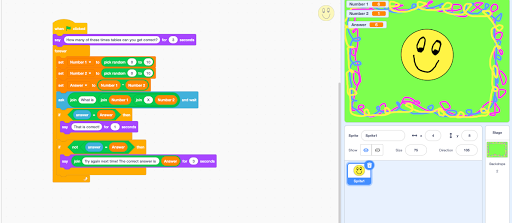
Since coding entered the NZ curriculum, there has been a real surge in teacher professional development in this area.  Personally I am thrilled to see an increasing number of students find the joy in code. It really does feel good to programme something, no matter how simple it might be. I have been very fortunate to have been able to include coding in my teaching since I first started out, thanks to the PD I received from  organisations such as OMGTech! and events such as EdTech Summits. The biggest enabler to my teaching however, is definitely the hour of code . If you haven't been on this site before then you have my blessing to stop reading this post and sign up to the site right now. Seriously, it makes coding so simple!                  There is of course some skill required to integrate coding into your current programme. This was why my colleague Hannah West and I lead a short workshop into bring code into maths. We hope t...

Supporting Health and Wellbeing; Students, Parents, Teachers

Image
How would you treat a pupil who came to you and said they were feeling overwhelmed? We teachers are experts at listening compassionately and supporting others through hard times. So why is it that we struggle to do the same for ourselves? This evening I attended a webinar lead by  Clinical Psychologist Dr Natalie Flynn and Dr Nina Hood of The Education Hub. Teacher Wellbeing At the moment, teachers are really struggling to allow themselves to feel stressed or low. We are going through a global pandemic. We are being asked to teach in a totally different way and it is hard. We must acknowledge that it is hard. And then we must stop beating ourselves up for not meeting high expectations. A good first step for teachers, as suggested by Dr Flynn, is to comprise a list of all of the things that you are expected to do. Then negotiate, prioritise,  work out what can feasibly be done and set a time to do it. You wont be able to do everything and that has to be okay.  We a...

Class onAir!

This year I am fortunate enough to be taking part in Manaiakalani Class onAir once again. Class onAir involves recording a lesson sequence and posting it online for the world to see. I share everything from my planning, lesson resources and the students completed learning at the end. Not only is this helpful to other teachers, but it supports me to reflect on my practice and challenges me to up my game!      I am just one of many teachers who are part of this programme. Over the years these teachers have covered a range of subjects from new entrants to year 13. You can explore the website here .

My Learning Journey

Image
During our final PLG of the year we created sites to display our learning this year. It was a great opportunity to reflect on our growth over the year and consider how fortunate we have been to have had this support. I think learning (and creating) the digital component of the MDTA has been one of the most enjoyable aspects of the course, after teaching the children of course! We have had the opportunity to create several different sites, videos, to code and animate - things I may never had tried otherwise! Have a look at the site that I have created to see some examples of these creations. Despite not having our Friday PLG's next year, I will still continue to make a conscious effort to develop my digital knowledge and to continue my learning journey.

PCT Site

Image
It can be a bit of a mission creating a PCT folder as a beginning teacher, but I have found my PCT Google Site far more efficient to use than an old ring binder! Once I set up my pages, I have found it fairly manageable to simply drop in digital reflections, observations, samples of student work and the like. In todays MDTA PLG we were given time and support to develop this website. I have followed the Manaiakalani template quite closely to create this site and have attached all of my evidence pages which can be accessed through the top bar. I have a page for each of the professionally certified teacher criteria and for other evidence of my practice such as my meeting minutes, reflections and release logs. Although the focus of this PLG was to ensure that this site was up to date, I found myself reflecting back on the year and considering some of the opportunities that we have been given. We discussed how much of our professional learning aligns with the criteria and I consider...

Visible Learning

Image
Are you teaching to accommodate you students learning preferences or simply teaching with your learning style in mind? This was a point of discussion in todays Manaiakalani digital immersion PLD which focussed on the notion that visible teaching and learning enables accelerated shift. We looked at this in the context of creating visible learning through our class sites, which must be both behaviourally engaging or interesting, and cognitively engaging which could be achieved through multi-modal activities. I believe that while my learners have learning preferences, they learn best when offered the opportunity to access information in a number of modes. While I have been successful at introducing topics in multiple modes and using a variety of multi-modal create activities, much of my teaching in reading has focussed on my learners first responding to a text orally and in written form.  However, our class site and 1:1 classroom environment allow me to go further than this an...

Hour of Code

Image
If you asked me during my high school ICT classes if I saw myself coding in the future, I would have laughed.  I felt overwhelmed and slightly uninspired when I was given the task to write a few commands in Javascript. However, when I encountered the Hour of Code last summer, I discovered coding in a new light and completed the 20 hour Accelerated Intro to CS course  out of interest! I also realised that this would be valuable knowledge to possess as a teacher, as coding is a skill that could benefit my learners in the future. In fact, thanks to their Computer Technology classes and previous teachers, many of my students are already competent coders. A proud moment for me this year was taking them to OMG Tech , and watching them create their own games through scratch, with little support from the facilitators. As we discussed future focussed learning in our PLG today, I was reminded of the importance of this skill and will definitely consider using the code.org and o...

Ignite presentation!

Image
Ignite presentations are efficient and ensure that the speaker uses their allocated five minutes wisely (and do not run over time). I had first experienced ignite talks at the Manaiakalani Hui, where teachers presented about their inquiries and found the concept impressive but daunting. The concept is simple, you have 20 slides which run for 15 seconds each,  adding up to a five minute presentation. From Try it Tuesdays! Blog In our PLG, we were given the task of creating an ignite talk on a topic that we pulled out of a hat. In my case, I was given the reading "Policies of Distraction" by John Hattie.  We were given three hours to learn about our topic and create our slides. These presentations were created through Keynote , which meant that we would be able to animate and time or slides simply. My slides became simpler as time went on! My topic was concerned with the policies that we create and follow, which do not accelerate learners. Hattie noted things li...

Stop Motion Through Keynote

Image
After discussing the use of Garageband a few years ago, I have found a new appreciation for Apple software. This weeks PLG on Keynote only affirmed this feeling, as I discovered how effective it can be, despite being a real fan of Google slides. Keynote Keynote contains more advanced features than I had experienced with Google Slides. It is possible to animate different elements of a slide (or the entirety of the slide if you were extra keen) and alter your images. Not only would these features be useful when creating interesting presentations, but they could be used to insert images into a movie or to create Stop Motion. As you can also edit the settings of the slideshow - e.g. to loop it or to vary the length of the slides, it is a great tool to use when presenting Ignite talks.  It can also run straight off your device, which could save you a lot of stress if you were presenting with a dodgy internet connection! I decided to manipulate my presentations to creat...

Video Band-Aids

Image
As I have been focussing on movie making for the last few weeks (and struggling) I have had to become quite resourceful in fixing some of the problems that we have encountered. I have discovered a few tricks that can save you in an emergency! Equipment A decent camera and tripod are essential for movie making, and having a microphone doesn't hurt either. As the teachers at my school shared one camera, I decided to use my one from home but I also experimented with my phone camera which I discovered could capture great video and audio. Shooting some test footage was really helpful as I uploaded it to iMovie to check the quality. I didn't quite have the budget to afford a proper tripod, but found that a phone tripod fit both my phone and camera and worked effectively. I purchased both a table top and full length phone tripod which was really helpful and kept my footage steady. I purchased these on sale at Typo Angles It was really easy to focus on the action live rath...

#Using Twitter to develop a PLN

Image
I have been idle on twitter for a couple of years, but it is only now that I have fully explored Twitter as a means of building a professional learning network (PLN). This morning we connected with James Hopkins  via Google Hangout, who shared a presentation with us regarding his journey with Twitter. I loved the notion of using Twitter as free PD and connecting with other educators who have different perspectives and experiences. It's interesting thinking about the different way people view change and technology in education, and how this is discussed through PLNS. After being inspired by James, the MDTA's began our first twitter chat, using #MDTAchat . Anne posed a series of provocations which we responded to and conversed with one another. I found this really interesting, although it was a little stressful! I hadn't considered the learning that could occur from something like this before and will be engaging in other chats, such as EdchatNZ more often.

Share through Infographics

Image
Today I attended a Manaiakalani PLG which focused on the share element of the Learn, Create, Share pedagogy. We first discussed the benefit that sharing has for our learners and we looked specifically at blogging. We investigated the  research  that has been conducted regarding the benefit of blogging during the school holidays and I was amazed at the effect that it had on the students learning. I created the following  sketchnote  to illustrate the key findings of this research, although I found this quite difficult to create as the information was presented live! We then discussed the way infographics can make data more accessible to viewers,  as our brains process images 60,000 times faster than text. If you are interested in using infographics, this website illustrates some of the infographics that are most commonly used. Our task was then to create infographics that were related to blogging. I decided to make an infographic for my two bloggers ...

6 Months In

Image
Birthday Wishes It doesn't seem that long ago that I was introducing myself to my class for the first time. I still remember how nervous I felt and how unreal it all seemed; I could barely believe that I was a real teacher. Now after six months of teaching it is surreal to look back and consider how much I have changed. I have learnt so much, become more confident and I have fallen more in love with teaching. At our Manaiakalani PLG we shared a highlight of our term with one another. For me, the highlight has been in creating more engaging lessons and activities for my learners. I have taken some risks in the lessons that I have taught (we took a few trips to the kitchen!) but I have thoroughly enjoyed them. Teaching procedural writing was my favourite unit this term as there were many opportunities for rich discussion and hands on activities. I introduced the topic by presenting my learners with some instructions to follow which required them to create electrical circuits....

Room 7 Superstars; Our Class Site

Image
After beginning my teaching career with a class site,  I cannot imagine teaching without one.  I have especially enjoyed watching my students engage in their learning outside of the classroom. There is so much that can be done with a google site and it can be a really engaging way of accessing ones learning. Over the past term and a half our class site has changed heaps; I am constantly finding new ways to display activities and will continue to do so. Ultimately, it is most important that the site is easy to navigate and that it makes learning accessible. My Class Site At this weeks MDTA PLG, we were learning about making screencasts. These could be used in the classroom as a way of recording part of the lesson - like a virtual modelling book. Apps like Educreations and Scree ncastify would best utilise screencasts in the classroom, as they allow the user to draw and write while recording.  However, our intention today was to simply create a screencast ...

Manaiakalani Google Class on Air

Image
It takes some time to get used to being observed in the classroom. I'll never forget how anxious I was as a student teacher being observed by my visiting lecturers. If I found this daunting, I cannot imagine how I would feel putting recordings of my lessons up on Youtube for the world to see. Yet this is exactly what five teachers across the Manaiakalani cluster are doing. On Friday we were visited by Matt Goodwin, who is one of the educators involved in Manaiakalani Google Class OnAir . He gave us the low down on the filming process and filmed part of our session using his filming equipment.  I could not believe that his lessons are uploaded directly from Google Hangouts to Youtube - particularly as the Youtube editor is quite simplistic. It must take a lot of courage to be part of this program! As we experimented with the option to upload a video taken on Google Hangouts to Youtube, it became clear that this could be used as a teaching tool. We are always discussing the p...

A day in the life of...

Image
After weeks of filming footage of our inquiry project,  I collected my class iPad and connected it to my school laptop to unveil... a complete disaster. Various scenes had mysteriously disappeared, the audio quality left a lot to be desired and the video; we had several shots that contained the green screen and half of the action. Fortunately, my learners are resilient; they quickly learned from our mistakes and created a short trailer depicting all that our original movie had promised, in under an hour. And fortunately for me, my last two MDTA PLG meetings were concerned with the creation of videos, so I will be better able to support them when editing. In this weeks session we were challenged to film and create a short "Day in the Life of" video about learning in our schools.  I found it quite challenging to find the time to film my learners while in the midst of teaching, and only managed to take footage of a few of my lessons. However, it was great to learn from my mi...

Explainer Video

Image
Today's goal was to create to learn, with our "create" taking the form of an explainer video. I definitely feel that I learnt a lot about creating video's - I now understand why my learners become so invested in them and how challenging they can be (when you take on something too ambitious!). As soon as Fiona introduced our learning intention I immediately began to recall the number of groups in my class who are in the middle of creating videos at the moment. I am extremely proud of the work that my learners have put into these videos, particularly a group of my writers who decided to plan a story through drama, as they created and recorded an effective movie in a short time frame.  They also created some wonderful pieces of writing because of this. Due to this groups success, I asked my reading group to create an ongoing movie which synthesised the texts that we read in the latter part of term one around Victorian England. It is now term two and I still have had ...

Thinking Critically

Image
In the modern world where truth can often be concealed, we must be able to sift fact from fiction. This is also the case for our learners, who must make sense of the information presented from various sources on the internet. During this week's MDTA PLG, we discussed the importance of teaching critical thinking in our classrooms. We considered how this could be covered in a various subject areas, including guided reading and social sciences. Caleb , an MDTA graduate, talked us through how he fostered critical thinking skills in his learners by discussing current events with them. He described how solo taxonomy can be used to support learners in developing this skill. Solo Taxonomy Model - HookED As I attended a professional development workshop regarding solo taxonomy at the beginning of the year, I intend to foster critical thinking through the use of this framework. I have introduced various critical thinking activities to my learners, including the hexagon task from H...

The Success of Many

Image
Some would say that racism pervedes every aspect of New Zealand culture. But nowhere is it more important to be aware of racial prejudices than in the education section.  On Friday, Pat Snedden (chair of the Manaiakalani Education Trust) delivered a  kōrero that required us to  consider racism in New Zealand.  He began by recounting the efforts taken by Ngāti Whātua to reclaim the land that had been wrongfully taken from them. It took great  effort on the part of Ngāti Whātua, but they rose from occupying a tiny amount of land in the 50’s to reclaim their land and becoming one of the most successful iwi in New Zealand.  This reminded us of the racism that has occurred in this country and the relevance that this has to us as educators. We cannot allow racism to present itself in our hidden curriculum and we must speak out about such matters. It is so important for our learners to feel empowered and proud to be who they are. There is still much to be ...

Becoming a Google Certified Educator

Image
After successfully completing a three hour exam, I am now a Google certified educator! I had completed my Google fundamentals training throughout the school holidays, so I was a little worried about taking the exam more than a month after completing the training. Despite having to go back and do a little revision, completing the training before school started meant I was much better prepared to teach in a Manaiakalani school. I found that still learnt a few things while taking the exam as it quite a large practical component. After completing some multi choice questions, you were given a temporary Google Apps for Education account and had to complete tasks using various Google tools. The tasks included assigning work in Google Classroom and working with student data in Google Sheets.                      Despite being a little anxious I passed the exam and felt that I over thought a lot of the questions. The Fundamenta...